StudyRise is a planning tool. It is not a content library. It does not provide video lectures, notes or ready-made flashcard decks, and in Exam Mode and University Mode you bring your own question bank. MBBS Mode is the exception: it includes a University Question Bank of past questions and a Viva Question Bank.
Otherwise you continue using the learning resources you trust, while StudyRise helps you plan what to study, when to review it and which areas may need more attention.
The platform supports three different ways of studying:
- Exam Mode for licensing examinations and other date-based exams
- University Mode for managing a semester
- MBBS Mode for following progress through a medical degree
Each mode is designed around a different type of academic journey. You can choose the one that best matches what you are preparing for.
What is StudyRise?
StudyRise is a study-planning and progress-tracking application that runs in your browser.
Instead of building a study timetable manually, you provide information such as:
- What you are preparing for
- When your examination or semester takes place
- How much time you can realistically study
- Which days you are available
- Any regular commitments that affect your schedule
- What you have already completed
StudyRise uses that information to help create a plan across the time available.
Once the plan is created, you can use the Today screen to see your immediate priorities, complete scheduled work, record study sessions and review your progress.
The aim is not to replace your books, question banks, lectures or flashcards. It is to give those resources a clearer place within your overall preparation. A fuller breakdown lives on the features page.
How StudyRise works
Although each StudyRise mode has its own features, the basic workflow follows four steps.
1. Set your goal and availability
Start with your main academic goal and its timeline. For an examination that is the exam type and target date; for a university student, the semester dates, units and assessment deadlines; for an MBBS student, the current phase, subjects and institutional requirements.
Then record the study time you can protect. Work shifts, classes, commuting, exercise, rest and religious observance all go in, so the schedule is built around the week you have.
2. Build a structured plan
StudyRise organises the available time into phases, tasks and study blocks. If you covered part of the syllabus before joining, record that progress at the start: the remaining work is then planned around what you have already covered and the time you have left. What you get is a structured starting point you can adjust at any time.
3. Follow the daily plan
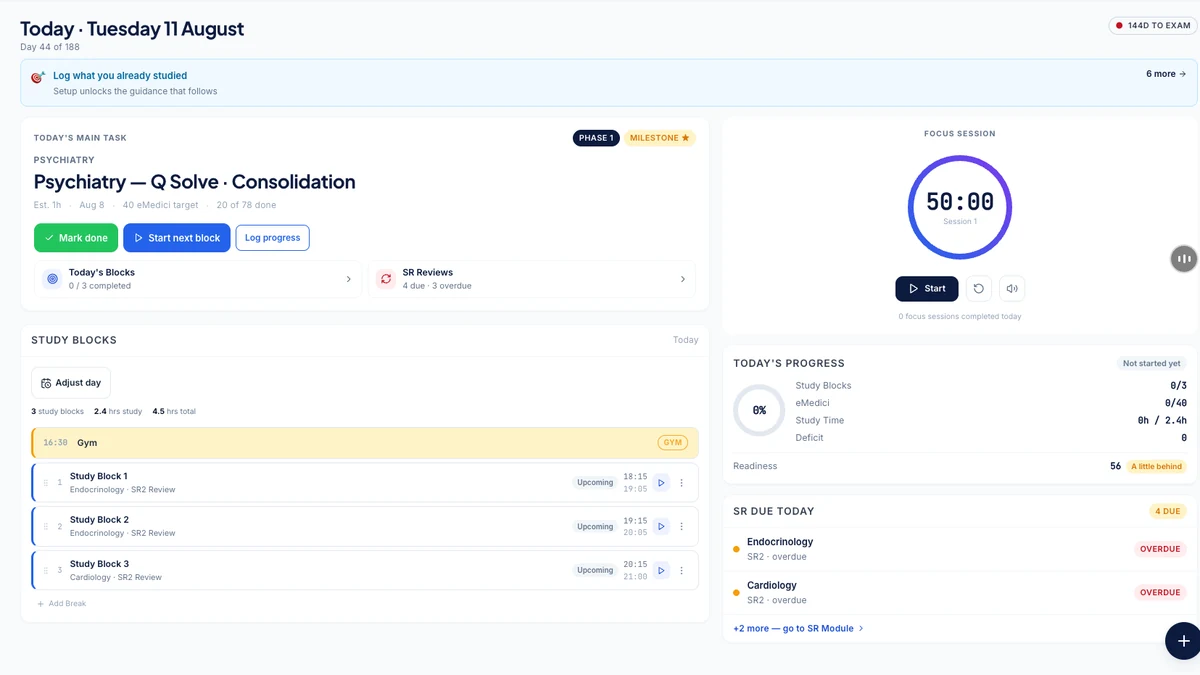
The Today screen gathers the parts of the plan that matter now, so a session starts with a clear view of what needs attention. It shows:
- The current day of your plan
- Time remaining before an important deadline
- Your main study priority
- Scheduled study blocks
- Reviews that are due
- Overdue or unfinished work
- A focus timer
- Daily study logging
4. Review and adjust
A plan rarely unfolds as expected. Work, illness, family responsibilities and shifting academic schedules all interfere, and a plan that cannot absorb them is a plan you stop opening.
As you record completed and missed work, StudyRise updates your progress and lets you reflow the remaining tasks without redrawing the schedule by hand. The point is to make the cost of a delay visible early enough that you can still respond to it.
Enter your goal, deadline and available study time, and StudyRise will organise the schedule around them.
The three StudyRise modes
StudyRise separates exam preparation, university study and medical-school progress because they involve different types of work.
An exam candidate may be working towards one fixed date. A university student may be balancing several assessments across multiple units. An MBBS student may need to track attendance, internal assessments, clinical activities and professional-examination requirements across a much longer period.
Each mode uses terminology and tools suited to that context.
Licensing examinations
AMC MCQ, PLAB 1, USMLE Step 1, or a custom examination you define yourself, organised around a fixed target date.
A full semester
Units, assessments, weightings, classes, attendance and grades, with GPA or WAM calculated from what you record.
A medical degree
Phases, subjects, cards and items, attendance by class type, formatives, vivas, ward postings and field placements.
Exam Mode
For students preparing for a fixed examination date.
Exam Mode ships with four modules:
- AMC MCQ
- PLAB 1
- USMLE Step 1
- A custom examination created by the user
Exam Mode begins with your target date, available study time and subject structure. It then helps organise your preparation into phases and daily tasks.
The main planning areas include:
- Today for the immediate study plan
- Plan for viewing the wider schedule
- Reviews for spaced-repetition work
- Question practice for recording practice sessions
- Mock exams for following performance over time
- Analytics for reviewing progress by subject or area
Question practice and mock examinations
You can record question-practice sessions and mock-exam attempts.
From what you log, StudyRise shows:
- Overall accuracy
- Subject-level performance
- Changes in scores over time
- Question pace
- Areas that may need further work
These records are intended to help you observe your preparation over time. They are not official examination scores.
AMC preparation tools
For AMC candidates, the AMC MCQ module organises preparation across the six blueprint domains in your study plan: adult health (medicine), adult health (surgery), women's health, child health, mental health, and population health and ethics. Those are the fields the AMC names in its own MCQ Examination Specifications (V8, PDF), linked here so you can count them yourself (checked 17 August 2026).
A recall-topic log records topics that have come up in recall discussions. It holds topic-level metadata only. Do not use it to store or reproduce protected examination questions.
StudyRise is not affiliated with or endorsed by the Australian Medical Council.
Catch-up planning
When you fall behind, the important question is whether the remaining work still fits into the time available.
StudyRise compares:
- Estimated work remaining
- Available study hours
- Overdue work
- Time left before the examination
It can then help you consider realistic adjustments to your plan. If the available time is insufficient, it tells you so plainly.
Consistency without streak pressure
StudyRise focuses on study patterns and completion trends. There is no streak to protect.
Active study days, planned rest days and missed days are shown separately, so a planned rest day never reads as a failure. The aim is to make patterns visible without turning one interrupted day into a reason to abandon the wider plan.
University Mode
For students managing a semester of units, classes, assessments, attendance and grades.
You can organise your semester around:
- Units or courses
- Assessment deadlines
- Assessment weightings
- Class schedules
- Attendance requirements
- Study sessions
- Grades
The dashboard helps bring together what is due, which periods are becoming busy and how each unit is progressing.
Timetables and calendar feeds
StudyRise imports your timetable and deadlines from your university's learning platform over a standard calendar feed. Canvas, Moodle, Blackboard and Brightspace/D2L each have their own setup path, and any other platform that publishes an iCal feed works through the generic option. Two things to know before you rely on it. A genuinely new item is queued for your approval before it reaches your plan, but a date your LMS moves on an item you have not edited yourself is applied quietly — and if you have edited that item by hand, StudyRise holds the change and asks which version to keep rather than overwriting you. And the check runs when you open the app, at most once every 20 hours, so nothing syncs while StudyRise is closed.
This may reduce the need to enter every class manually. Changes made by the institution can be reflected when the calendar feed is synchronised.
Grades and targets
University Mode calculates your academic progress on your institution's own grading system. Six are built in: percentage, GPA 4.0, GPA 7 with WAM, CGPA 10, UK honours and pass/fail. You pick yours when you set the semester up, and you can try the same grade maths without an account in the free grade calculator.
Depending on the course setup, students may be able to:
- Record assessment results
- Calculate GPA or WAM
- See the contribution of completed assessments
- Estimate the result required on a remaining assessment
- Compare possible grade scenarios
These calculations depend on the assessment information and weightings entered by the user. Students should confirm all official results and progression requirements with their institution.
Attendance and workload
Attendance is tracked by unit and by class type — lecture, tutorial, lab, seminar, workshop, clinical or online. When skipping one more class would drop a unit below 80% attendance, StudyRise says so in the skip dialog before you confirm. That 80% hurdle is fixed and applies to every tracked unit, so check it against the rule your own institution publishes.
StudyRise can also help show busy periods across the semester, making it easier to identify weeks in which several assessments or classes compete for the same study time.
MBBS Mode
For students progressing through a medical degree.
Medical-school progress involves more than one examination date. Students may need to manage:
- Phases or academic years
- Subjects
- Cards, blocks or institutional progress units
- Individual curriculum items
- Lecture, tutorial and practical attendance
- Formative assessments
- Written examinations
- Viva or oral examinations
- Ward postings
- Field placements
- Professional-examination requirements
MBBS Mode keeps these different parts of the curriculum connected, so none of it collapses into one long to-do list.
A structure that can match your medical school
Medical programmes do not all use the same curriculum or assessment system.
StudyRise can provide a starting structure that users can customise by:
- Renaming phases and subjects
- Adding or removing subjects
- Changing cards, blocks or curriculum items
- Adjusting assessment structures
- Recording relevant attendance categories
This allows the system to reflect the terminology and organisation used by the student's own medical college or university.
Where a default MBBS structure is provided, treat it as a starting template. It does not describe every medical programme.
Question banks
MBBS Mode is the one place where StudyRise supplies question content of its own.
A University Question Bank holds seeded and verified past questions, which you can browse by subject and mark as studied. A separate Viva Question Bank covers oral examinations. You can also add your own private questions alongside the shared ones.
Browsing both banks is included on the free tier; unlimited viva practice sits on the paid plan.
Academic progress and eligibility
Where the necessary information has been configured, MBBS Mode can bring together progress across coursework, assessments and attendance.
It may help students identify incomplete requirements or areas that need attention before a professional examination.
Any eligibility or progress result shown by StudyRise is an organisational estimate based on the information entered. Official eligibility is determined only by the student's medical college, university or relevant academic authority.
No social competition
MBBS Mode is focused on personal academic organisation.
It does not need leaderboards or public competition to be useful. The objective is to give each student a clearer record of their own progress and responsibilities.
How progress and readiness are measured
StudyRise uses the information you record to provide a progress or readiness estimate appropriate to your selected mode.
In Exam Mode, this may include:
- Practice and mock-exam performance
- Subject or topic coverage
- Completed and overdue tasks
- Review activity
- Consistency over time
If there is not enough information to produce a useful estimate, StudyRise says so and asks for more data; it will not display an unsupported result.
Examining bodies use different scoring and standard-setting systems. For that reason, StudyRise does not treat a raw practice percentage as equivalent to an official examination result.
A readiness indicator is a planning tool. It cannot guarantee that a user will pass or fail an examination.
In University Mode, progress can be considered against assessment weightings, recorded grades and attendance information.
In MBBS Mode, progress can be considered against the course structure, completed requirements, assessments and attendance information configured by the student.
The quality of every estimate depends on the accuracy and completeness of the information entered.
What StudyRise includes — and what it does not
StudyRise is a planning and tracking platform.
It can help you:
- Organise a syllabus or curriculum
- Build a study schedule
- Set daily priorities
- Schedule reviews
- Record study sessions
- Track question-practice and mock performance
- Identify overdue work
- Review progress over time
- Adjust your plan when circumstances change
StudyRise does not provide:
- Video lectures
- A notes library
- Ready-made flashcard decks
- A question bank in Exam Mode or University Mode — you supply your own
- Official examination results
- A guarantee of passing
- Academic or medical advice
MBBS Mode is the one exception to that list: it ships a University Question Bank and a Viva Question Bank, described in the MBBS Mode section above.
You can continue using tools such as Anki, question banks, textbooks, university learning systems and lecture platforms alongside StudyRise. If you would like to try the planning layer on its own first, the free study planner is a good place to start, and the pricing page sets out what each plan includes.
How is StudyRise different from Anki or a calendar?
Anki is designed primarily for reviewing flashcards. A calendar records dates and events. A spreadsheet gives you a flexible way to record information manually.
StudyRise focuses on the planning layer connecting those activities.
It helps organise what you intend to study, when it should happen, when it should be reviewed and how that work relates to the time remaining. The review scheduling itself is covered in more detail in our guide to spaced repetition for exams.
You do not necessarily need to replace your existing tools. StudyRise can be used alongside them.